

Embedded Mongosh Engine
NoSQLBooster embeds the latest mongosh engine (v2.8) with full MongoDB Shell compatibility, top-level await, and modern ES2022+ syntax. Supports MongoDB 3.6-8.2
Query Code Generator
Converts MongoDB find/aggregate and SQL into Node.js, Java, Python, C#, PHP, Ruby, Golang and mongo shell languages
Tasks and Task Scheduler
Define and perform tasks to import/export, dump/restore, or run script files on a recurring schedule.
Why Choose NoSQLBooster for MongoDB?
True IntelliSense
NoSQLBooster for MongoDB offers true IntelliSense experience. The built-in language service knows all possible completions, methods, properties, variables, keywords, even the MongoDB collection names, field names, and operators. The IntelliSense suggestions pop up as you type. You can always manually trigger it with Ctrl-Shift-Space. Out of the box, Ctrl-Space, Alt-Space are acceptable triggers.

- In the script editor, parameter hints pop up as you're typing a method invocation.
- We offer tons of built-in snippets, Handy date range snippets, SQL to MongoDB conversion snippets...
- The mouse hover shows much useful information, such as types of symbols, function definition, type information, and document.
- Matching brackets are highlighted as soon as the cursor is near one of them.
Click here to learn more about code editing and script processing.
Query MongoDB with SQL
With NoSQLBooster for MongoDB, you can run SQL SELECT Query against MongoDB. SQL support includes SQL JOINS, functions, expressions, aggregation for collections with nested objects and arrays.
Let's look at how to use the GROUP BY clause with the SUM function in SQL.
Instead of writing the MongoDB query which is represented as a JSON-like structure
db.employees.aggregate([{
        $group: { _id:   "$department", total: { $sum: "$salary" }}
    }])
You can query MongoDB by using familiar SQL, which you probably already know.
SELECT department, SUM(salary) AS total FROM employees GROUP BY department
SQL Query Features
- Access data via SQL including WHERE filters, ORDER BY, GROUP BY, HAVING, DISTINCT, LIMIT
- SQL Functions (COUNT, SUM, MAX, MIN, AVG)
- Date, String, Conversion Functions (dateToString, toUpper, split, substr...)
- Aggregation Pipeline Operators as SQL Functions
- SQL Equi JOIN and uncorrelated sub-queries
- Provide a programming interface (mb.runSQLQuery) that can be integrated into your script
- Autocomplete for keywords, MongoDB collection names, field names, and SQL functions
Please note that MongoDB does not natively support SQL features. The SQL query is validated and translated into a MongoDB query and executed by NoSQLBooster for MongoDB. The Equivalent MongoDB Query can be viewed in the console.log tab.
Click here to learn how to run SQL SELECT Query against MongoDB
Monitor and Tune for Performance
NoSQLBooster provides rich performance monitoring and analysis tools to help you keep your MongoDB environment running smoothly.
- Visual Explain Plan, transforms explain output into a hierarchical view, allowing for query tuning to enhance query and resolve performance issues.
- Server Real-Time Status (mongostat), view MongoDB real-time performance metrics as a chart or tabular form.
- In-progress Operations Viewer, find and kill long-running MongoDB operations quickly.
- MongoDB Log Parser, easier to parse, filter, and analyze MongoDB log information.
- Database Profiler, collects detailed information about Database Commands executed against a running mongod instance.
- GUI for mongotop, tracks the time required to read and write operations thoroughly.
- Troubleshoot Replica Sets
The following is a screenshot of Visual Explain, Click here to learn more about NoSQLBooster Performance Monitoring Tools.

Learn MongoDB with Free Interactive Samples
The "My Queries" tab is used to open user-saved query scripts quickly. By default, the user-saved query script is saved as a "connection -> database -> query name" directory structure. Double-click to open a saved query script will automatically connect to the appropriate database server and switch to the proper database.
The "Samples" tab includes several NoSQLBooster-Enabled tutorials. All samples are executable in NoSQLBooster already, with detailed descriptions. You can try these queries and change them to learn better.

Chaining Fluent MongoDB Query
NoSQLBooster for MongoDB supports mongoose-like fluent query builder API. A Query enables you to build up a query using chaining syntax, rather than specifying a JSON object. The aggregation framework is now fluent as well. You can use it as currently documented or via the chainable methods.
// instead of writing:
db.user.find({age:{$gte:18,$lte:65}},{name:1,age:1,_id:0}).sort({age:-1, name:1});

// we can write:
db.user.where('age').gte(18).lte(65).select('name age -_id').sort("-age name");

// passing query conditions is permitted too
db.collection.find().where({ name: 'nosqlbooster' })

// chaining
db.collection
    .where('age').gte(18).lte(65)
    .where({ 'name': /^nosqlbooster/i })
    .where('friends').slice(10)

// aggregation
db.companies.aggregate()
  .match($.where('founded_year').gte(2000).lte(2010)) //$: operator helper
  .group({_id:"$category_code",count:{$sum:1}})
  .sort('-count')
  .limit(100)
MongoDB Script Debugger
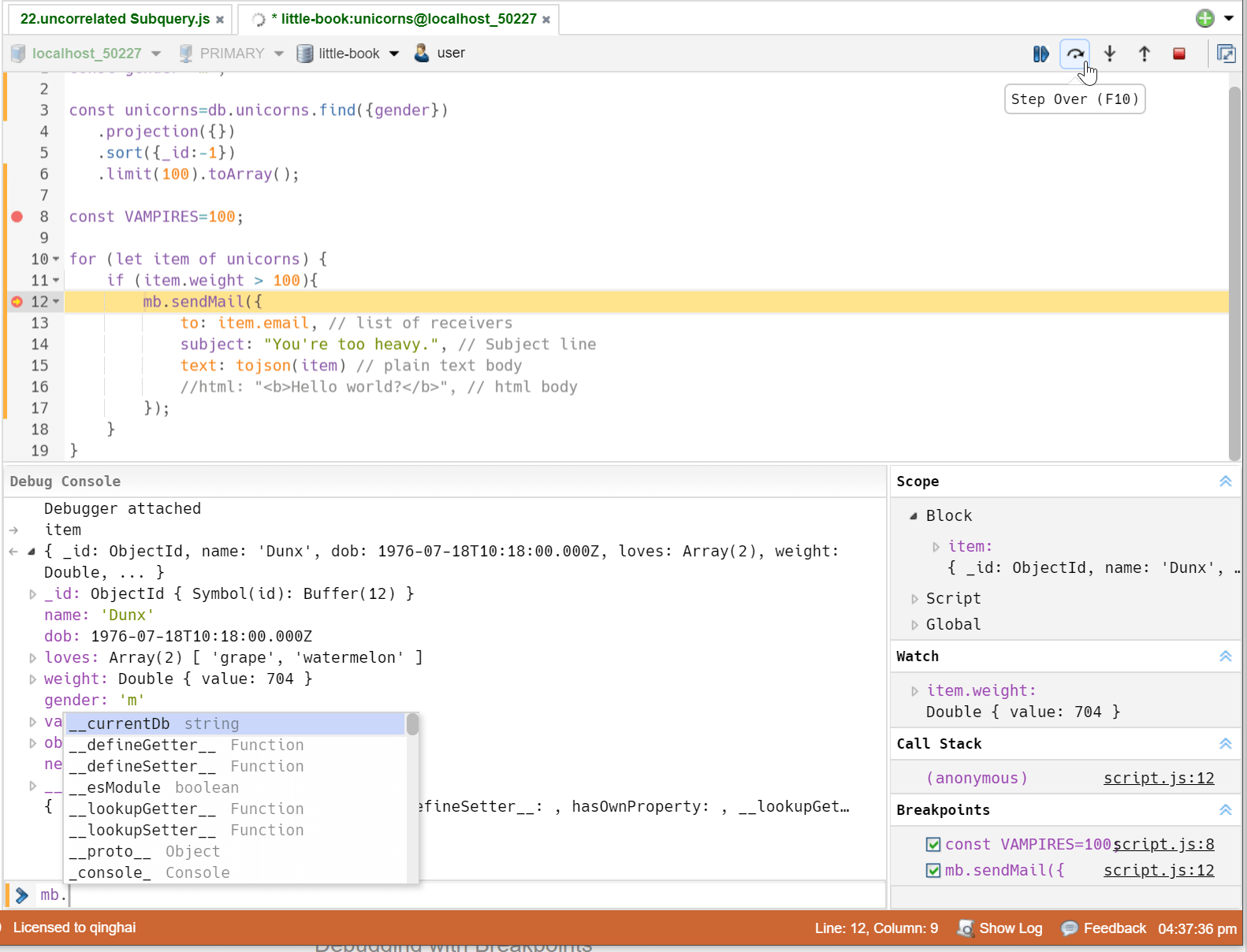
Still debugging your MongoDB script with print statements? Now, you can use NoSQLBooster's built-in debugging capabilities to set breakpoints and step through code.
To start debugging, click the editor's text margin to set a breakpoint F9, and run with debugger F5. When your breakpoint is hit, you can explore the call stack, watch and edit variables, and interact directly with the debugger.
Shell Extensions, Using Node Modules, Lodash, Momentjs in Your Script
NoSQLBooster for MongoDB is an electron-powered desktop application that embeds the latest mongosh engine (v2.8) and Node.js 22.x runtime. You can use any Node.js built-in global objects and modules (console, util, fs, path ...) and pure JS NPM packages in NoSQLBooster for MongoDB. It also adds mongoose-like fluent API, provides mb.runSQLQuery function, integrates a few utility modules (lodash, moment, shelljs, mathjs) to global scope to make the life inside of the MongoDB script a little bit easier.
Here's how to install and use the npm package.
Launch NoSQLBooster for MongoDB.
- Execute Main Menu -> Help -> Open User Data Directory
- New Terminal at this folder
npm i axios # run it in NoSQLBooster for MongoDB user data directoryAfter successfully installing this package in the NoSQLBooster for MongoDB User Data Directory, you can require and access it in the NoSQLBooster for MongoDB script.
const axios = require("axios");
const rst = await axios.get('https://api.github.com/users/github'); // top-level await
console.log(rst.data);
The following figure shows the use of lodash and Moment.js directly in mongodb shell scripts.

Enable SSH Tunneling
GUI for MongoDB Tools - mongotop, mongostat...
MongoDB Enterprise Authentication, Kerberos & LDAP(PLAIN)