We are thrilled to announce the release of NoSQLBooster 11.0 — the most significant upgrade in the product's history. This major version embeds the latest mongosh engine (v2.8) directly into the IDE, delivering full MongoDB Shell compatibility with top-level await, modern ES6+ syntax, and all the latest aggregation operators. The data viewer has been completely rebuilt on AG-Grid for faster rendering and inline cell editing. On macOS, NoSQLBooster now ships native Apple Silicon builds for M1/M2/M3/M4 Macs, and the entire application has been upgraded to support MongoDB 3.6 through 8.0 with improved performance and security.
This release represents over 1,500 commits of engineering effort, delivering a faster, more secure, and more feature-rich MongoDB administration experience.
If you want to try NoSQLBooster 11.0 out now, you can get it from the following link.
NoSQLBooster 11.0 Download Link
The product will automatically enter the 30-day trial mode after a successful installation. At the end of the 30-day trial period, the product becomes a free edition. The free version is free for personal/commercial use but with limited functions.
The following figure shows the main interface of version 11.0.
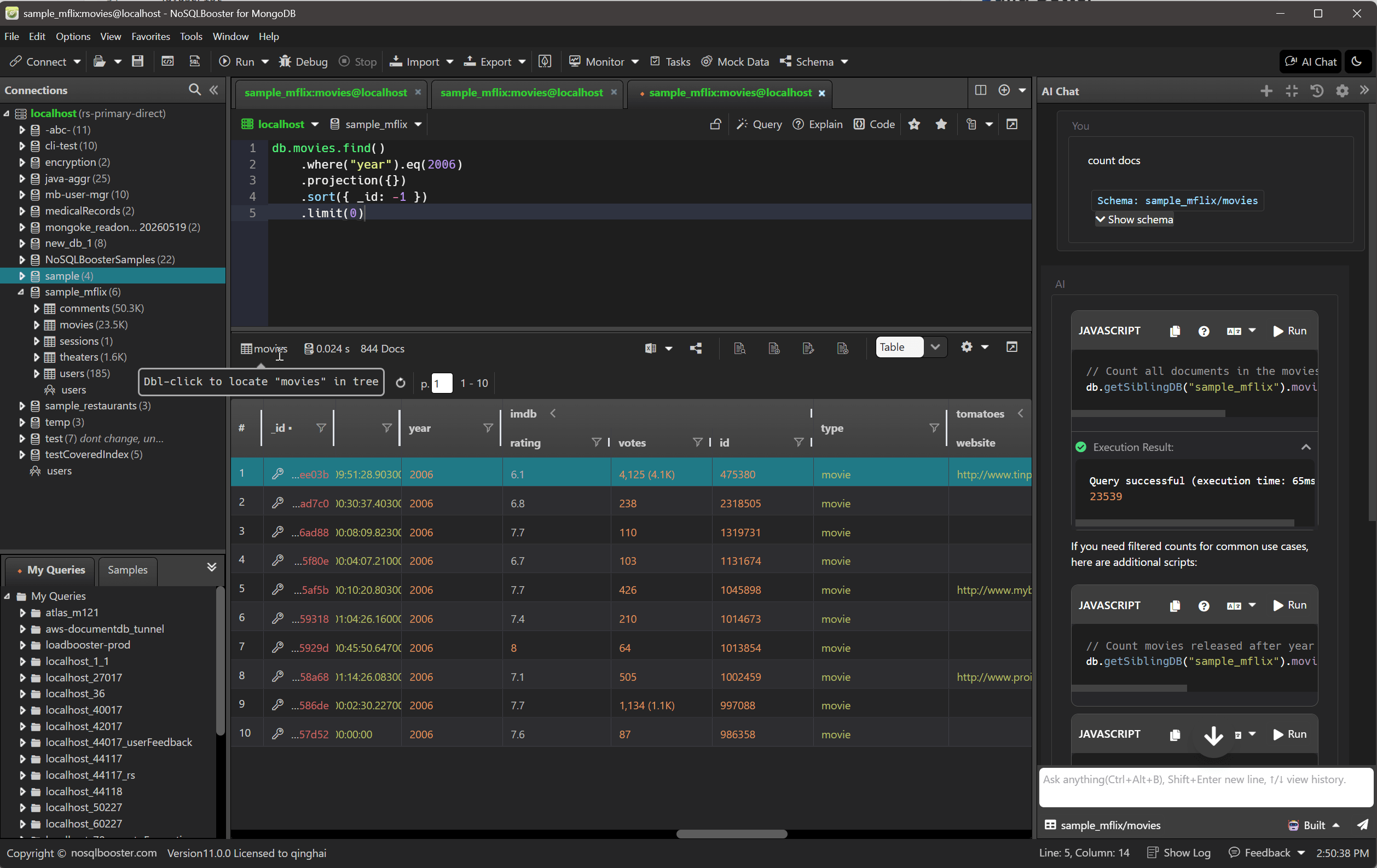
Let's dive in and get an overview of what's coming in NoSQLBooster 11.0!
Although we are showing screenshots of NoSQLBooster for Windows, all these new features are available for macOS and Linux as well.
What's new?
- Embedded Mongosh Engine (v2.8)
- Rebuilt Data Viewer with AG-Grid
- Native Apple Silicon Support
- Modernized Technology Stack
- Feature Highlights
- Visual Query Builder
- Script Debugger
- Batch Copy Multiple Databases
- Non-Intrusive Tree Node Tooltips
- DBRef Follow Reference with One-Click SQL JOIN
- Intelligent Document Preview
- Tree View Preview Fields
- Enhanced Connection Tree
- Auto TypeScript Mode Detection
- Query Profiler Enhancement
- Toolbar and UI Improvements
- Connection Editor
- Security and Authentication
- Faster Startup
- Data Import and Export
- SQL Import and MongoDB Tools
- Mock Data Generator
- AI Helper
- Other Notable Improvements
- Breaking Changes and Migration
Embedded Mongosh Engine (v2.8)
The headline feature of NoSQLBooster 11.0 is a completely rewritten embedded MongoDB Shell engine. NoSQLBooster 11.0 adopts @mongosh/async-rewriter2 — the same technology that powers the official MongoDB Shell — effectively embedding the latest mongosh engine (CLI version 2.8.2) directly into the IDE. This gives you a first-class mongosh experience without leaving the graphical environment.
What this means for your daily work:
- Full mongosh compatibility — any script written for the official mongosh works in NoSQLBooster without modification
- Top-level await — your own async code (custom Promises,
fetch, etc.) can useawaitdirectly at the top level; shell-api methods likefind(),toArray()are auto-resolved as before - All MongoDB 8.0 operators — every new aggregation stage and operator from MongoDB 8.0 is available immediately
- Better error messages — source-mapped stack traces point to the exact line in your script, not to internal engine code
- Cross-platform consistency — identical behavior on Windows, macOS, and Linux
1 | // Fluent cursor API — works without await, same as before |
1 | // Modern JavaScript + aggregation pipeline + top-level await |
Rebuilt Data Viewer with AG-Grid
The data viewer has been rebuilt from the ground up on AG-Grid, delivering a significantly improved experience for browsing and editing query results. Key improvements include:
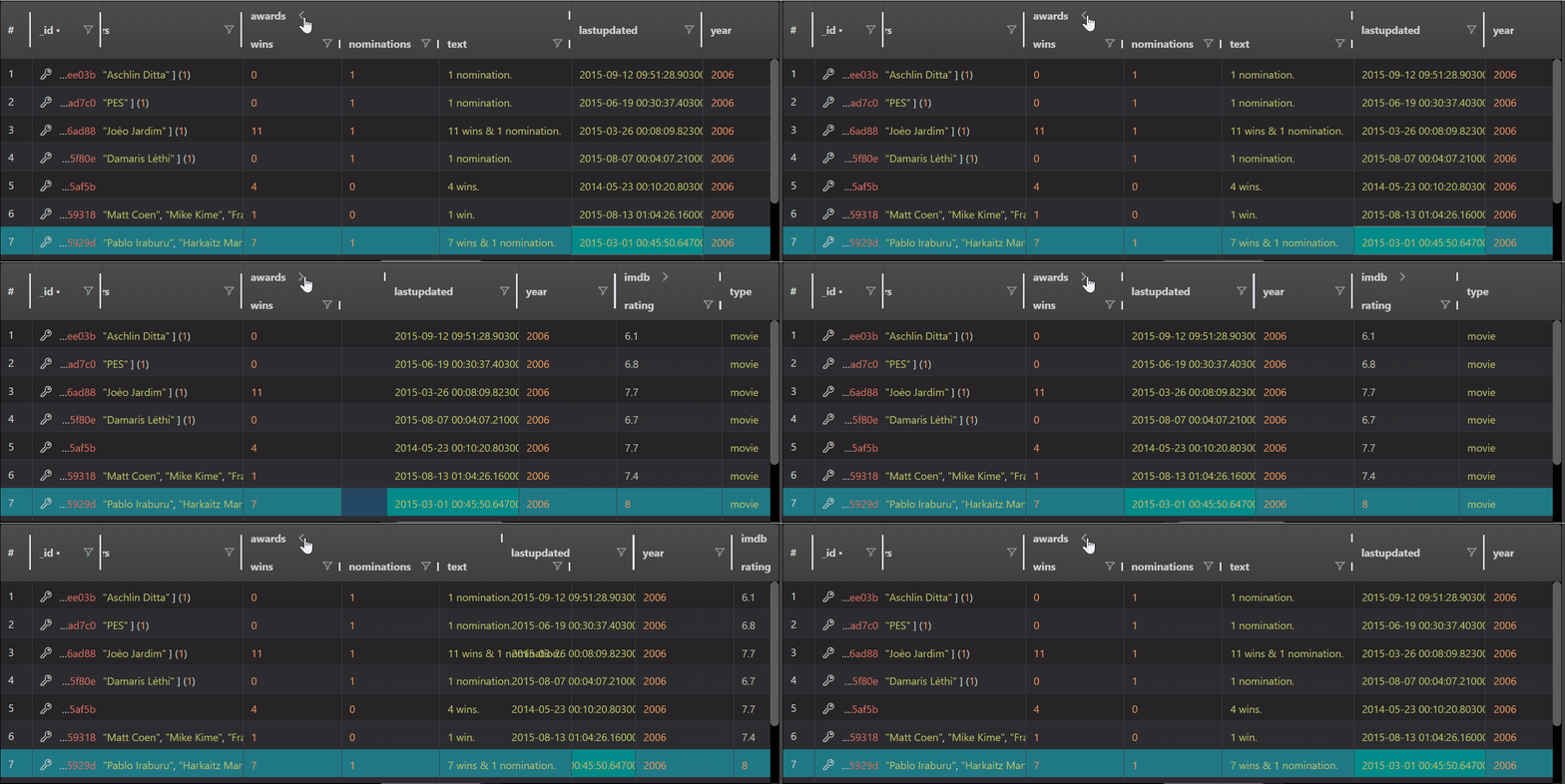
- Nested field column groups — nested document fields are automatically organized into collapsible column groups (e.g.,
address.city,address.zipare grouped underaddress), making deeply structured MongoDB documents easy to navigate - WebGL-accelerated rendering — large datasets render with hardware acceleration; the application automatically detects WebGL support and prompts accordingly
- Column state persistence — column widths, ordering, and visibility are remembered between sessions
- JSON Viewer large content handling — when JSON output exceeds 2MB, the viewer initially shows the first 500KB for instant responsiveness, with a "Show All Content" button to load the full content on demand
- Inline cell editing — press Enter on any editable cell to modify values directly in the table, no separate dialog needed
show dbs/show tablesin table view — these common commands now display results in a clean table view automatically instead of plain text- Encrypted field detection — CSFLE/Queryable Encryption fields are identified via
schemaMap,encryptedFieldsMap, and runtimeBinData(6)detection, and clearly marked in the data view - DBRef follow reference — clicking a database reference opens the related document in a new shell tab for seamless navigation
- Double-click to locate in tree — double-click the collection icon in the data viewer toolbar to automatically expand and scroll to that collection in the object explorer tree
Native Apple Silicon Support
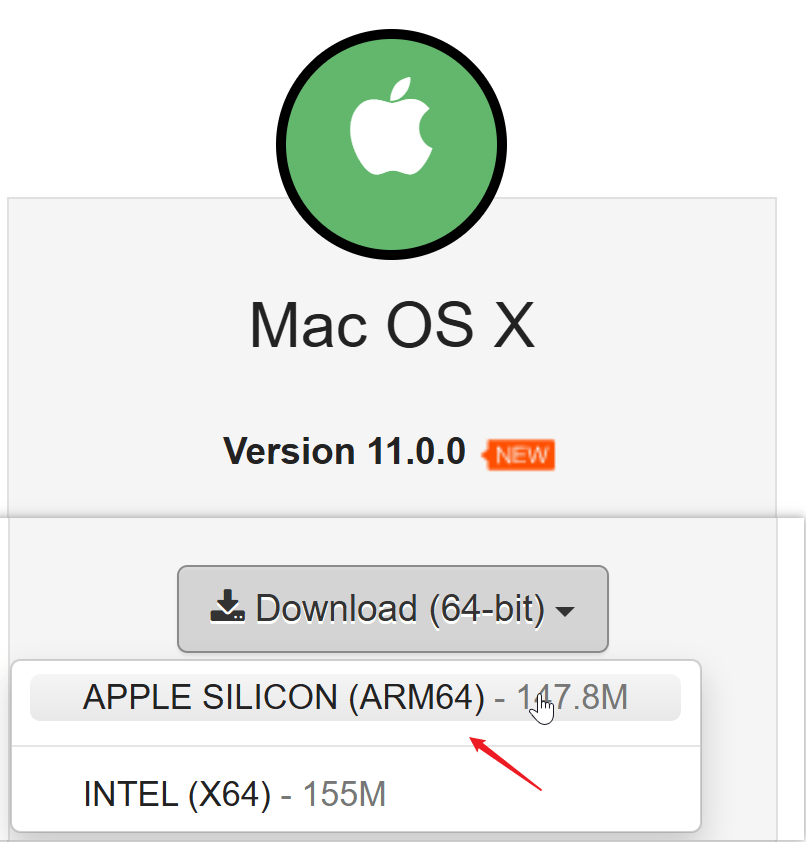
NoSQLBooster 11.0 now provides separate native builds for Intel (x64) and Apple Silicon (arm64) Macs. If you're using an M1, M2, M3, or M4 Mac, you can now run NoSQLBooster natively — no more Rosetta 2 translation overhead.
- Native performance — the application runs directly on Apple Silicon, delivering faster query execution and smoother UI interactions
- Faster startup and lower memory usage compared to the translated x64 build
- Separate DMG installers for each architecture — download the one that matches your Mac
This release also resolves the macOS Tahoe (macOS 26) system-wide lag issue that affected Electron-based applications.
Modernized Technology Stack
To support the new mongosh engine and deliver a better overall experience, NoSQLBooster 11.0 has been rebuilt on a modernized technology stack. While these changes are mostly under the hood, they provide the foundation for faster performance, improved stability, and future feature development.
| Component | Version 10.x | Version 11.0 |
|---|---|---|
| Electron | 11.5 | 40.9 |
| Chromium | 87 | 134 |
| Node.js | 12.x | 22.x |
| MongoDB Node.js Driver | 6.9 | 7.2 |
| BSON | 6.7 | 7.0 |
| Frontend Framework | Vue 1.x | Vue 3.5 |
| Data Grid | EasyUI | AG-Grid 34.2 |
The modern Chromium engine delivers better rendering performance, improved security, and full support for modern web standards. The upgraded frontend framework brings significantly faster UI rendering, and the switch to AG-Grid enables inline editing, WebGL-accelerated large dataset rendering, and advanced column management in the data viewer.
Feature Highlights
Beyond the foundational platform changes, NoSQLBooster 11.0 delivers a wealth of functional improvements that enhance day-to-day productivity. Here are the most notable features organized by category.
Visual Query Builder
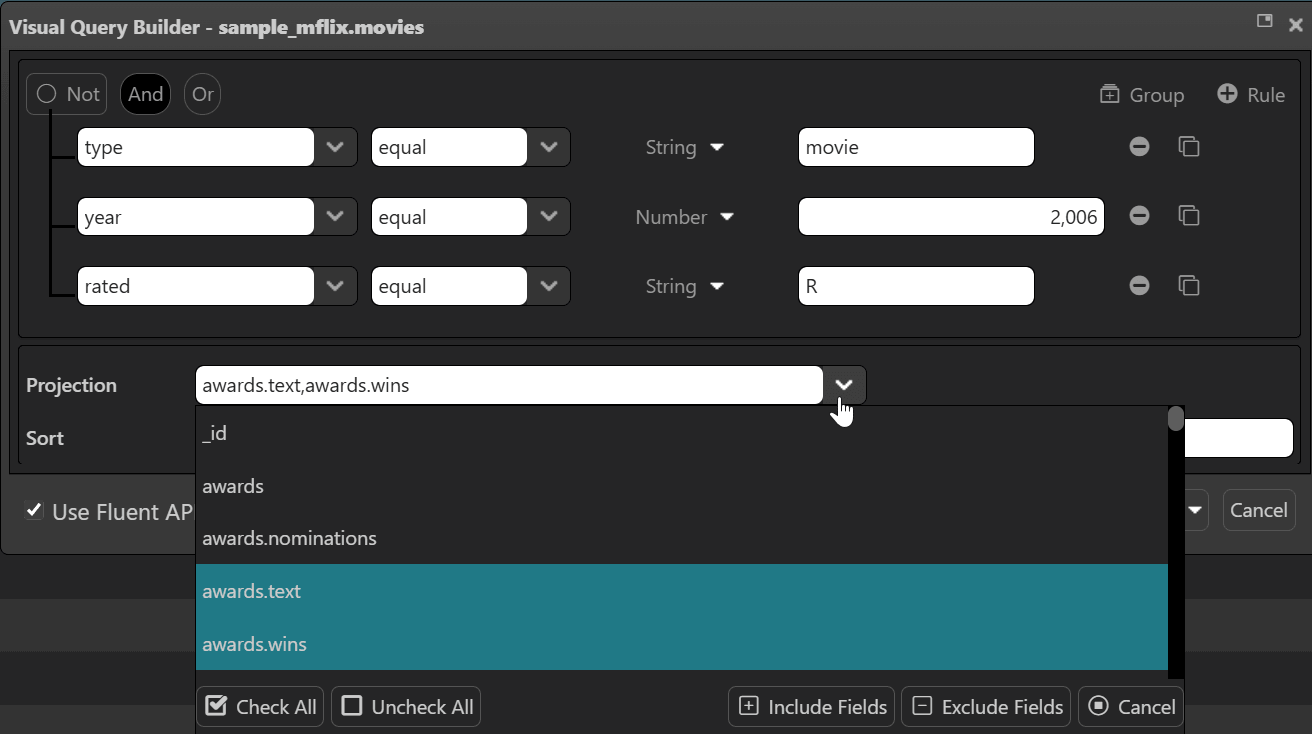
The Visual Query Builder has been completely rewritten for better responsiveness and a cleaner layout. Query construction is now faster and more intuitive, with improved drag-and-drop interactions and real-time preview of generated query conditions.
Script Debugger
The built-in script debugger works reliably with the new mongosh engine:
- Accurate source mapping — breakpoints map correctly to your original script code, even when the engine transforms it behind the scenes
- Proper script termination — stopping at a breakpoint correctly terminates the script instead of letting it continue to completion
- Sandboxed debugging — debugger operations are isolated from the main application for stability
Batch Copy Multiple Databases
You can now select multiple databases and copy them to a target server in a single operation, instead of copying them one by one. This is a great time-saver when migrating or consolidating databases across servers.
Additionally, the Rename Database script template has been significantly improved. Since MongoDB does not provide a native rename command, NoSQLBooster implements this by moving all collections and users to the new database, with smarter error handling and automatic cleanup of the empty source database.
Non-Intrusive Tree Node Tooltips
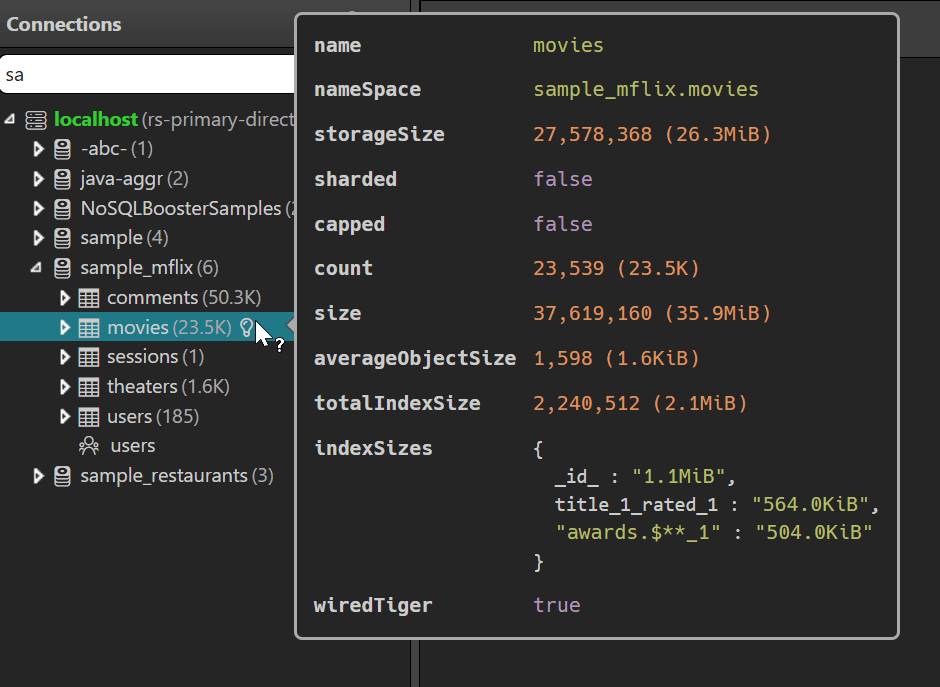
In previous versions, hovering over any node in the connection tree would immediately pop up a tooltip — often blocking the node name and surrounding information during normal browsing. Version 11.0 fixes this by adding a dedicated info icon to the right of each tree node (connections, databases, collections, indexes, and more). The tooltip now only appears when you hover over this icon, so it never interferes with reading the tree. Each node type shows its own contextual information — for example, index nodes display live indexStats (access counts, operation statistics), while collection nodes show document count and storage size.
DBRef Follow Reference with One-Click SQL JOIN
The Follow Reference dialog now features a "SQL JOIN in shell" button that instantly generates an equivalent SQL JOIN ($lookup) statement based on the DBRef relationship. This is a great time-saver when you need to explore relationships between collections:
- One-click generation — click the button and NoSQLBooster opens a new shell tab with the SQL JOIN query, pre-filled and auto-executed
- Cross-database awareness — if the referenced collection is in a different database, a warning comment is added to the script since
$lookuprequires both collections in the same database - Smart field mapping — the generated query automatically maps the source field (e.g.
orders.userId) to the target collection's_id
1 | // Generated SQL JOIN from a DBRef field "userId" referencing "users" collection |
The equivalent native mongosh statement uses the $lookup aggregation operator:
1 | db.orders.aggregate([{ |
Intelligent Document Preview
The document preview in the tree/table view has been enhanced with intelligent field selection that picks the most meaningful fields to display:
- Multi-language field name matching — recognizes common field names across 8 languages (English, Chinese, Japanese, Korean, Spanish, French, German, Portuguese) using deburred snake-case normalization
- Smart identifier filtering — automatically skips GUID/ObjectId/UUID/MD5 values that carry no semantic meaning for preview purposes
- Priority-ordered display — fields are shown by importance priority rather than raw document key order, so the most informative fields appear first
For example, a document with {_id: ObjectId("..."), nombre: "Carlos", apellido: "García", email: "carlos@example.com"} will intelligently prioritize nombre and email in the preview rather than starting with the _id.
Tree View Preview Fields
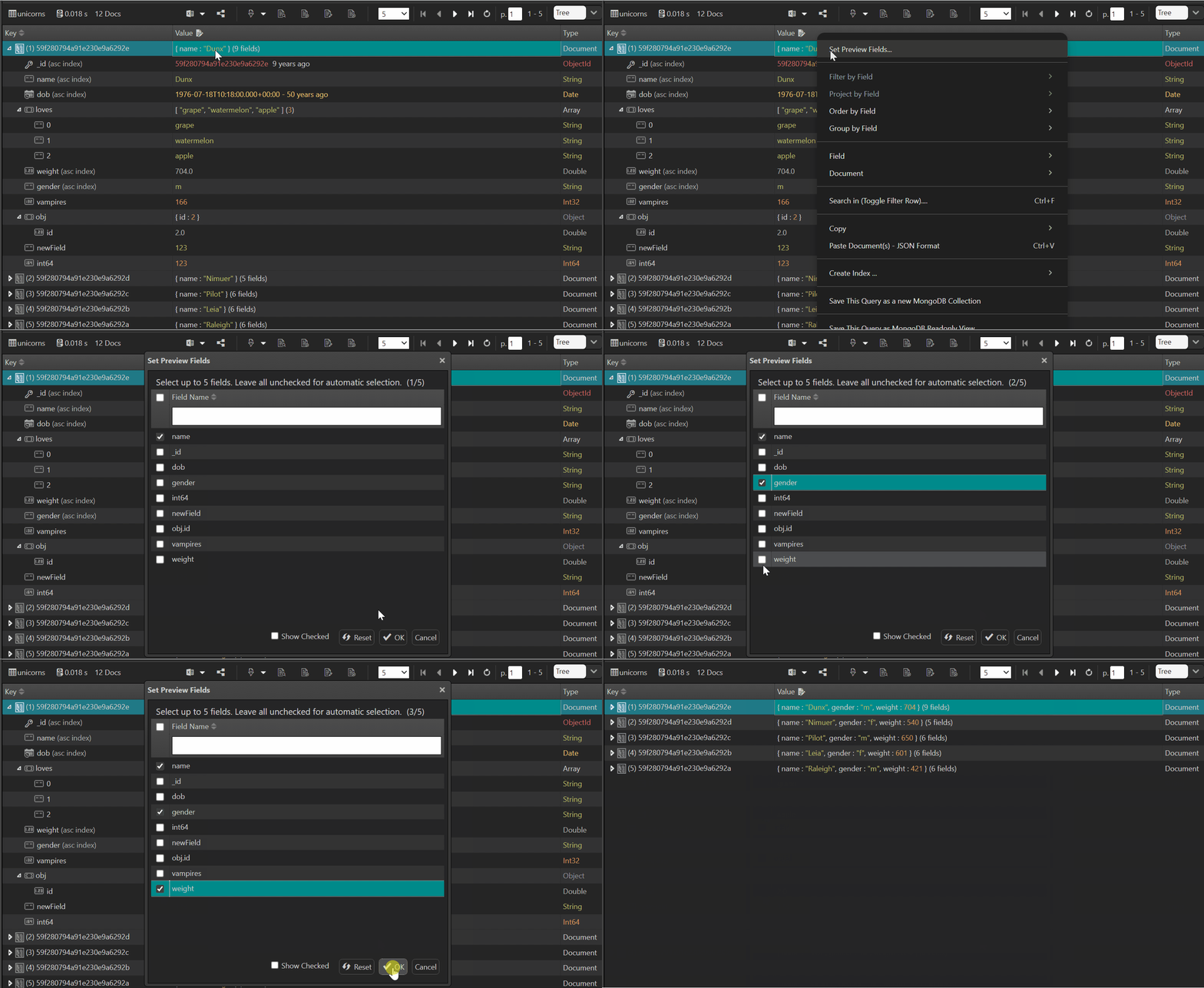
Version 11.0.4 introduces a powerful new capability for the Tree View data browser — Set Preview Fields. Instead of relying solely on auto-detected summaries, you can now hand-pick which fields to display as the preview for each document in the tree.
- Per-collection field chooser — right-click any collection row and select "Set Preview Fields..." to open a field selection dialog. Check up to 5 fields (with a live counter) to customize what you see at a glance.
- Connection-level persistence — your field selections are saved per connection in the configuration, so they survive across sessions and devices.
- Nested path support — select nested fields using dot-notation (e.g.,
address.city,order.customer.name) to surface deeply buried values without expanding the document. - Smart auto mode — when no fields are specified, the Tree View automatically selects up to 3 meaningful fields, while filtering out sensitive data (passwords, tokens, API keys) and complex object types for a clean, secure summary.
- Intelligent truncation — long field values are truncated at 60 characters per field (240 characters total), keeping the tree compact while preserving the most informative content.
Enhanced Connection Tree
The database object explorer has received substantial improvements for navigating large connection trees:
Smart Node Filtering
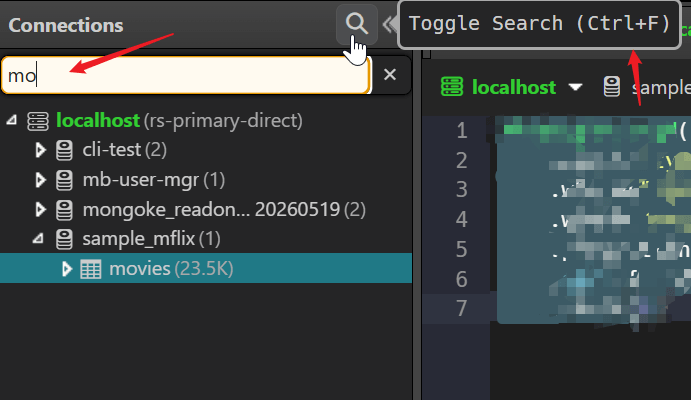
The tree search now supports namespace-format filtering — you can type patterns like db.collection to precisely locate nodes deep in the hierarchy. The filter logic matches against both the node's own name and its ancestor chain, so sales.orders will match the orders collection under the sales database.
- Word-level matching — type partial words to match nodes and their ancestors
- Namespace format — use
database.collectionsyntax for precise filtering - Flexible partial matching — empty parts are allowed for maximum flexibility
Large Connection Search Confirmation
When searching in a connection tree that contains a large number of databases/collections, NoSQLBooster now detects the scale and prompts for confirmation before proceeding, preventing accidental performance impacts. A loading indicator is shown during the search, and you can cancel the operation at any time to stop the backend query.
Text Truncation with Full Tooltip
Long node names in the connection tree are now truncated in the middle (e.g., very_long_collection...suffix) rather than being clipped at the end, preserving both the beginning and ending of the name. The full name is displayed in a tooltip on hover.
Auto TypeScript Mode Detection
The script editor can now automatically detect whether a script file should be opened in TypeScript mode based on its content. If the editor detects TypeScript-specific syntax (type annotations, interfaces, etc.), it will switch to TypeScript parsing without requiring manual mode selection.
Query Profiler Enhancement
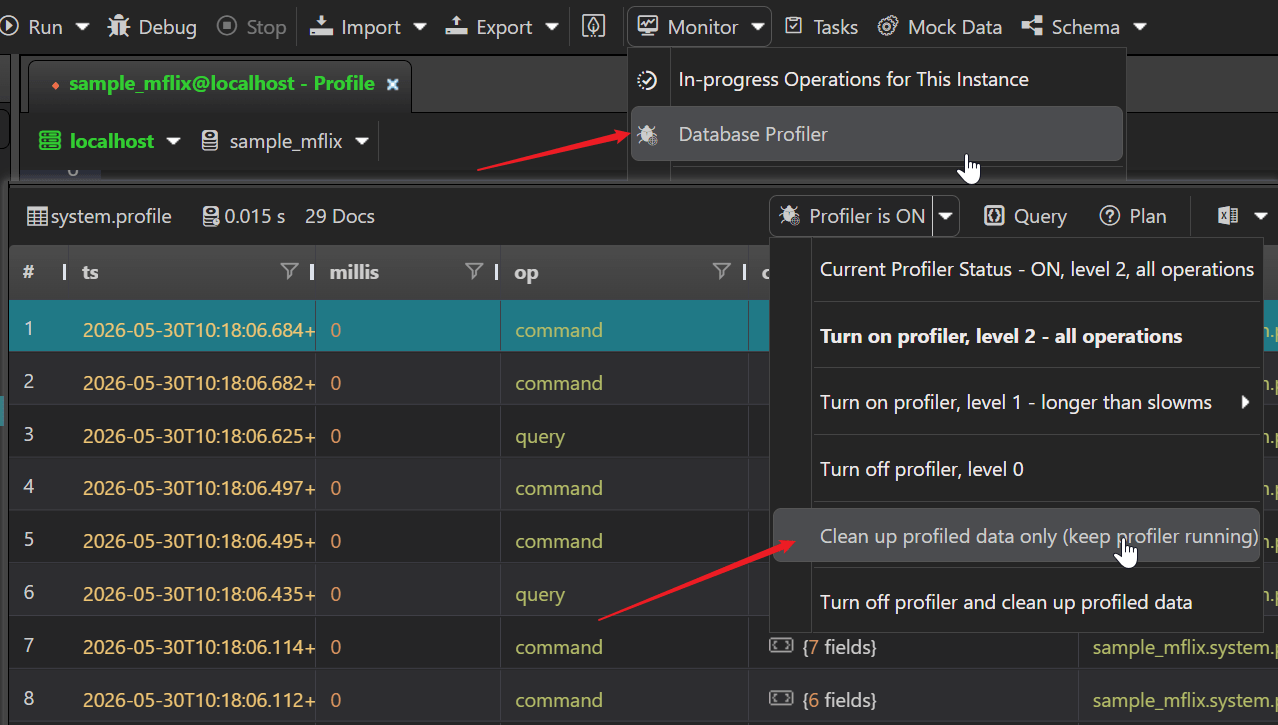
A new "Clean Profiled Data" option allows you to clear all collected profiler data while keeping the profiler running. Previously, you had to turn off the profiler to clean up its data. This is useful when you want to start a fresh profiling session without interrupting the monitoring workflow.
Toolbar and UI Improvements
- Text selection enabled globally — all UI elements now allow text selection (
user-select: auto), making it easy to copy values, error messages, and other text from the interface; previous versions blocked text selection by default - Clear recent files — a new toolbar action to clear the recent files list with one click
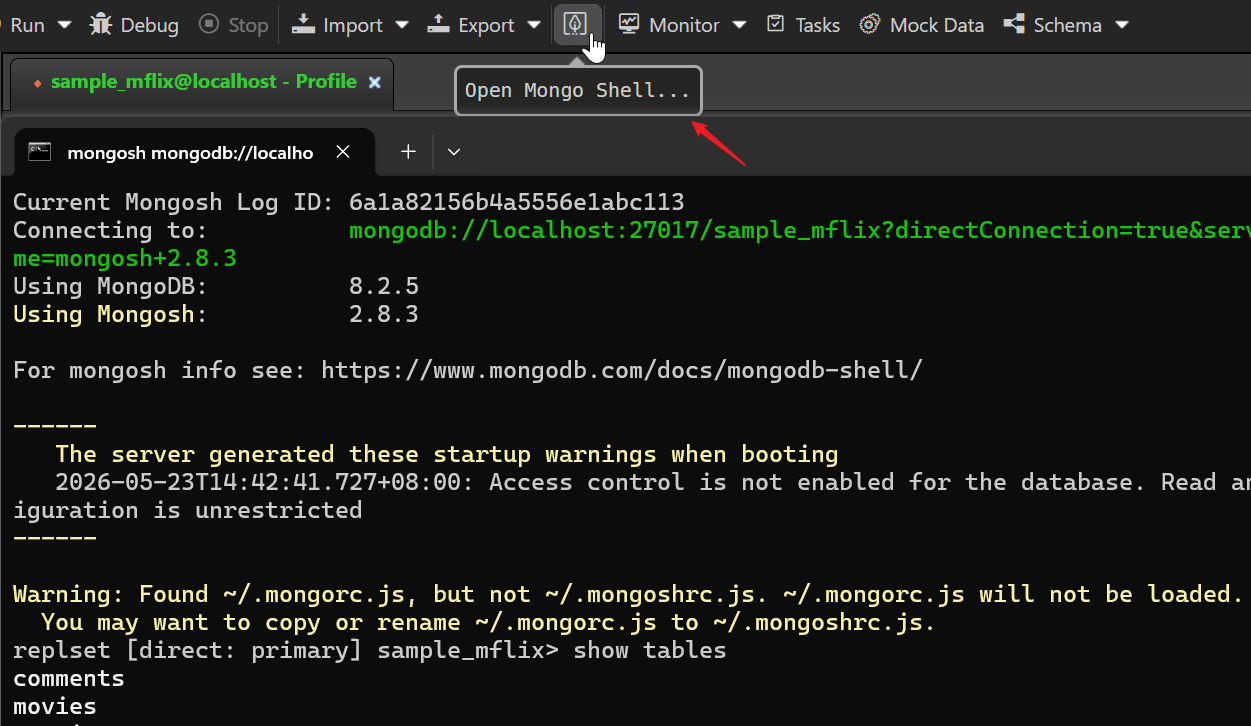
- MongoShell icon — the toolbar now features a dedicated MongoShell icon for quick shell access
Connection Editor
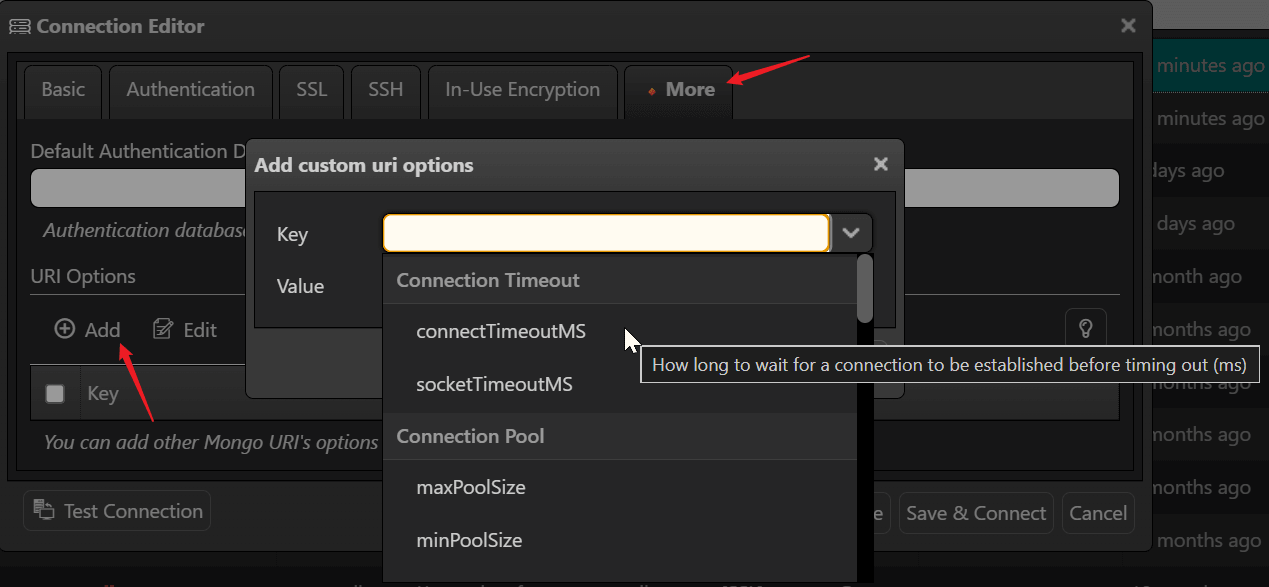
The "More" tab in the connection editor has been enhanced with a comprehensive set of MongoDB URI options:
- Complete URI option catalog — all standard MongoDB URI options are now available in the "Add URI Option" dialog, no need to remember option names
- Categorized display — options are grouped by function: Connection Timeout, Connection Pool, Write Concern, Read Concern, Read Preferences, Server, Compression, and Miscellaneous
- Inline tooltips — hovering over an option shows a clear description of what it does (e.g.,
connectTimeoutMS: "How long to wait for a connection to be established before timing out") - Default value pre-fill — selecting an option automatically fills in its recommended default value
Security and Authentication
Enhanced Authentication
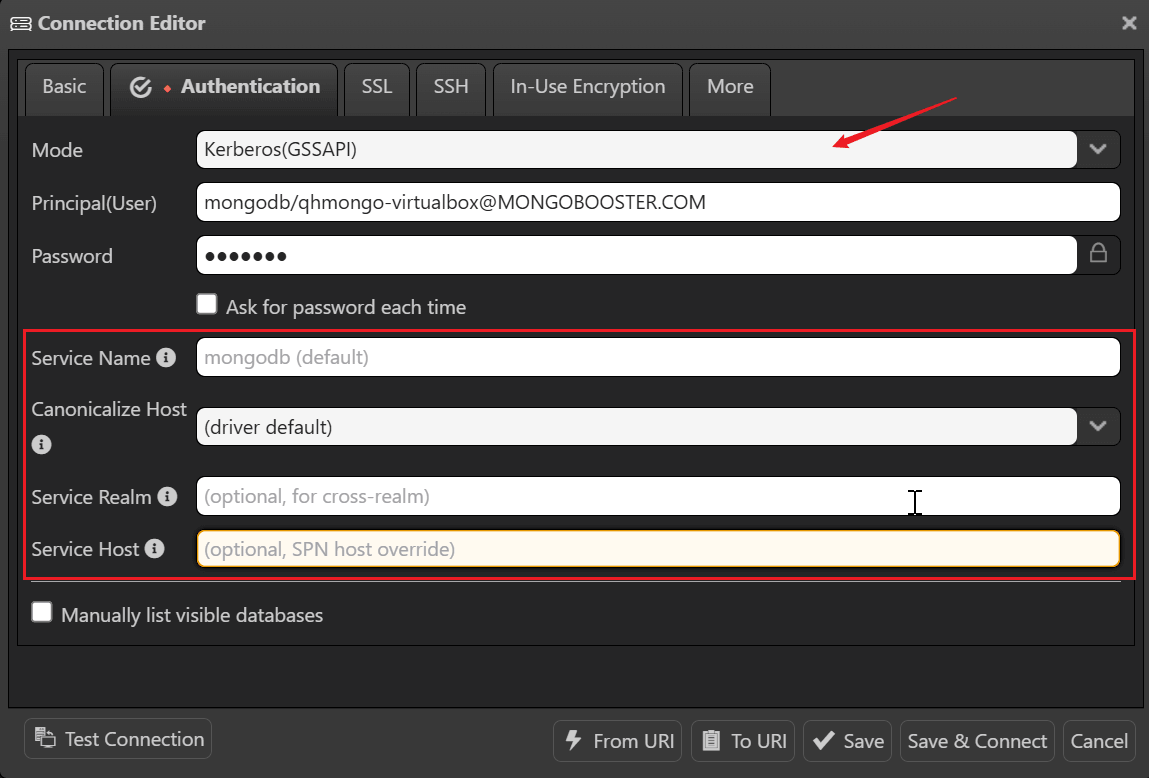
- Kerberos (GSSAPI) connection options — selecting Kerberos as the authentication mode now reveals a dedicated set of form fields for easy configuration: Service Name (SPN), Canonicalize Host, Service Realm (for cross-realm authentication), and Service Host (SPN host override); these were previously unavailable and required manual URI string editing
- OIDC self-hosted endpoints — connect to your organization's own OIDC provider with a new "Consider Target Endpoint Trusted" tri-state option
- Auth mode validation unified across frontend and backend for consistent security policy enforcement
Application Security
- Dynamic Content Security Policy — CSP is now injected at runtime, enabling support for custom AI API endpoints while maintaining security
- Reduced attack surface — Electron Fuses lock down security-critical features at build time; unused Chromium features are disabled
- HTTPS enforcement — all external resource loading upgraded from HTTP to HTTPS
Faster Startup
NoSQLBooster 11.0 launches noticeably faster thanks to several optimizations:
- V8 compile cache — JavaScript code is cached after first compilation, reducing subsequent startup time
- Deferred initialization — non-essential features load on demand rather than at launch
- Non-blocking file dialogs — opening and saving files no longer freezes the UI
Data Import and Export
Export with Global Date Format Settings
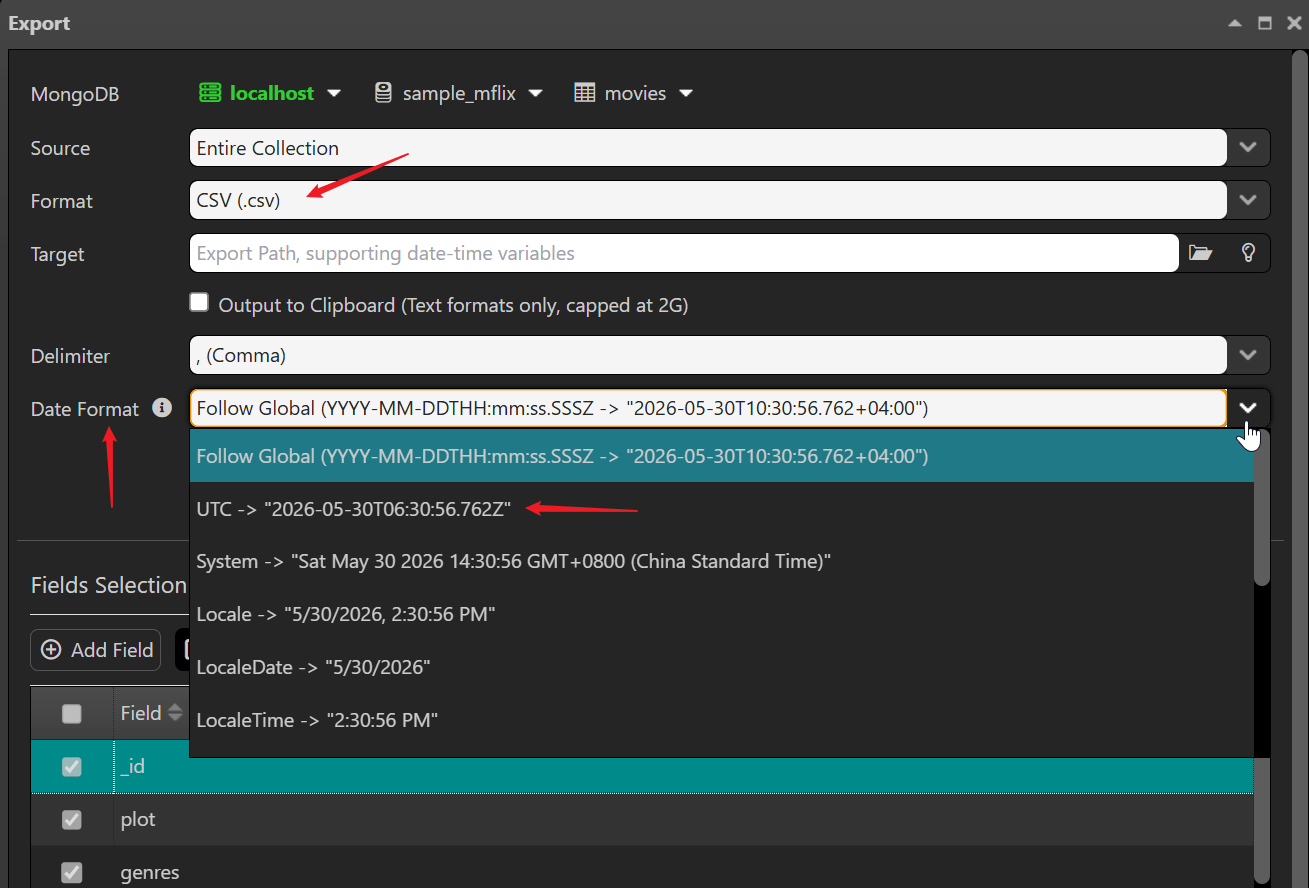
When exporting query results to CSV or Excel, the export now respects the global dateFormat and utcOffset settings configured in the application. This ensures date/time values in exported files are consistent with your display preferences, eliminating the need for post-export formatting.
- Follow Global selection — the export dialog automatically follows the global date format setting
- Progress feedback — XLSX, HTML, and TXT exports now report progress to the frontend via sandbox console, so you always know how far along the operation is
Improved MongoDB Tools Path Configuration
The configuration for external MongoDB tools (mongodump, mongoexport, mongoimport) has been refactored with a caching mechanism for faster access. Path handling has been improved to correctly support spaces and UNC paths on Windows.
SQL Import and MongoDB Tools
SQL Import Enhancement
The SQL Import feature has been significantly improved with smarter table/view handling and safer name mapping:
- Table vs View recognition — SQL tables and views are now distinguished automatically via
INFORMATION_SCHEMA(MySQL/MSSQL) orpg_catalog(PostgreSQL); views are marked with a(view)label in the import list - Views unchecked by default — since views contain derived data, they are not selected for import by default, preventing redundant data duplication
- Automatic name sanitization — source table names and column names containing characters unsafe for MongoDB (
.,$, whitespace,/,\,\0) are automatically converted to safe identifiers (e.g.,dbo.users→dbo_users,first name→first_name) - Field mapping auto-suggestions — when choosing which fields to import, columns with unsafe characters automatically show a sanitized destination field name
- Editable connection combobox — easily switch between SQL database connections
- Tree refresh with focus — tree view automatically refreshes and focuses on newly imported collections
- Northwind sample URI — includes a sample connection string for quick testing
MongoDB Tools Integration
- Refactored MongoDB Tools (
mongodump,mongoexport,mongoimport) path configuration with caching - Fixed export path component handling for spaces and UNC paths on Windows
- Increased
execAsyncbuffer size for large operations
Mock Data Generator
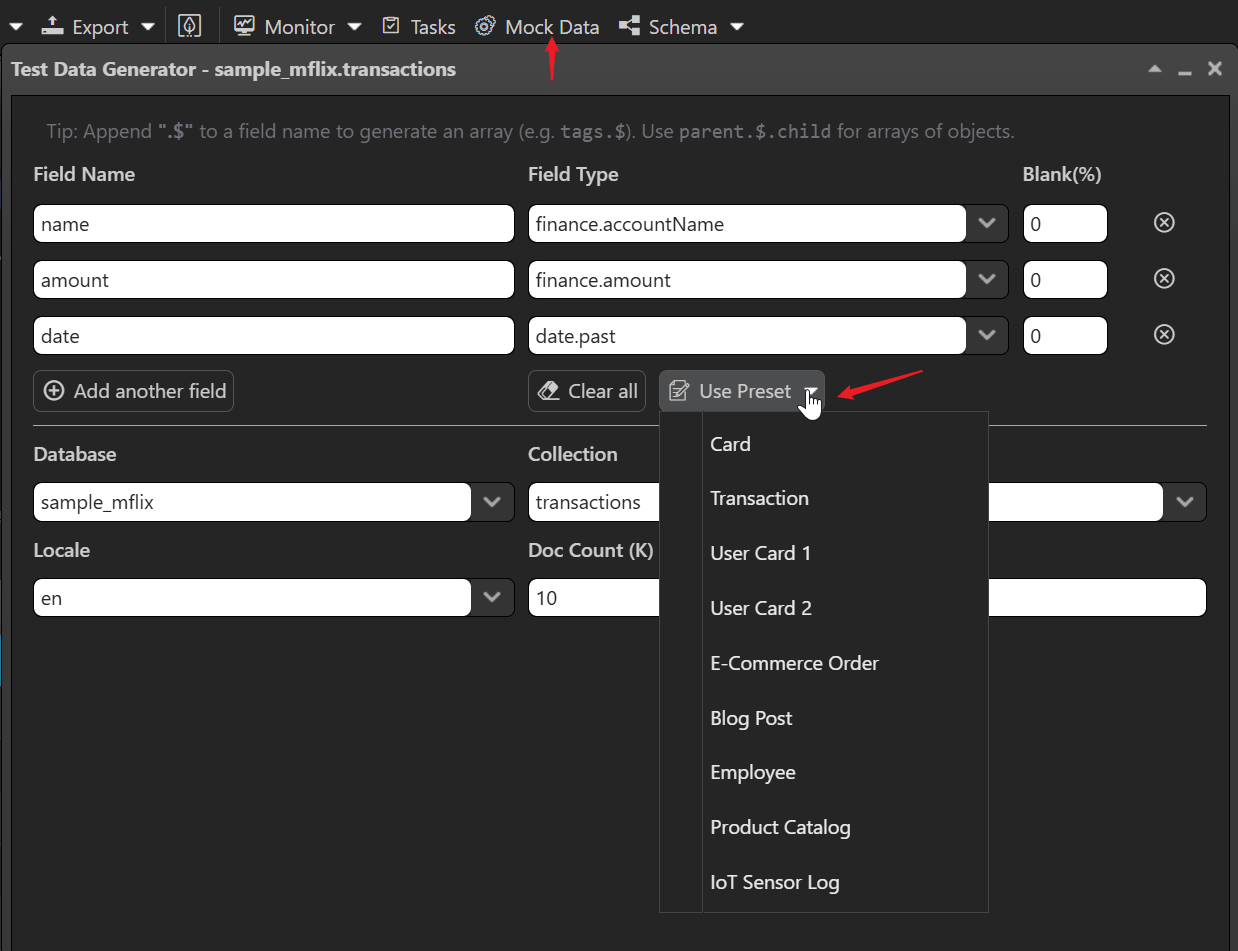
The Test Data Generator has been renamed to Mock Data and received significant usability improvements:
- Renamed to "Mock Data" — the toolbar button now displays "Mock Data" for a clearer, more concise name
- Array field hint (
$) — a tip banner at the top of the dialog explains how to generate arrays: append.$to a field name (e.g.,tags.$generates an array of values;items.$.productNamegenerates an array of objects) - Preset templates — 9 built-in templates for common data patterns: Card, User Card 1/2, E-Commerce Order, Blog Post, Employee, Product Catalog, Transaction, and IoT Sensor Log; each pre-fills field names, types, and collection names
- Refactored field type list — field types are now dynamically fetched with virtual-scroll support, showing inline examples on hover for easier selection
- Robust error handling — field-type errors are surfaced clearly, and null-connection scenarios are handled gracefully
AI Helper
The built-in AI Assistant has been upgraded with an improved backend model and smarter prompts:
- Upgraded backend LLM — the AI Helper now uses a more capable language model on the backend, delivering higher-quality responses and better code generation
- Smarter MongoDB prompts — system prompts have been refined to generate more accurate MongoDB shell statements that can be directly copied and executed in NoSQLBooster
- Collapsible panel — the AI chat panel can now be fully hidden when collapsed (previously it remained visible as a narrow sidebar), reclaiming valuable screen real estate for the data viewer and script editor
- Custom AI endpoint support — users can configure their own AI API endpoints; dynamic CSP (Content Security Policy) automatically adjusts to allow custom endpoints while maintaining security
Other Notable Improvements
Task Management
- Copy command line for multiple shells (Windows) — the "Copy Command Line" menu now offers three shell formats: CMD, PowerShell, and Git Bash, each generating the correct syntax for that shell (e.g., PowerShell uses
$env:Pathand&operator; Git Bash usesexport PATH=...); previously only CMD format was available - Enhanced task connection status checking with color marking for quick visual identification
- Improved Linux headless mode and CLI compatibility (AppImage command fix, X Server crash fix)
- Cron task environment compatibility improvements for Linux
Schema Explorer
- Optimized Schema Analyzer connection management and error handling
- Fixed async collection statistics retrieval
- Improved toolbar styling and button spacing
Miscellaneous
- Upgrade MongoDB Node.js driver to 7.2
- Upgrade BSON to 7.0
- Upgrade embedded mongosh to CLI version 2.8.2
- Remove Google Analytics integration for improved privacy
- GridFS contentType storage and edit dialog display restored
- Cross-platform multi-cell selection fix for macOS/Linux
- Logger window toolbar optimization and pause state synchronization
Breaking Changes and Migration
Due to the fundamental engine rewrite, NoSQLBooster 11.0 introduces several breaking changes. We've prepared a detailed Migration Guide with side-by-side code examples. Here is a summary of the key changes:
Shell Script Migration (Fibers → Mongosh)
Mongosh's async-rewriter automatically resolves shell-api promises (e.g. find(), toArray(), countDocuments()) — so most scripts work without modification. However, there is one critical behavioral difference:
.forEach(async () => {}) must be converted to for...of
The async-rewriter cannot transform async callbacks inside .forEach(). This is the most common migration issue:
1 | // ❌ v10.x — async callback in forEach worked via Fibers, but WILL FAIL in v11.0 |
Other minor differences
1 | // ❌ cursor.count() is deprecated (since MongoDB 4.0) |
Shell-api methods like find(), insertOne(), aggregate() etc. do not need await — only your own custom Promises and non-shell-api async calls do.
In-Use Encryption Configuration Format
The autoEncryptionOptions are now stored as a JavaScript expression (autoEncryptionOptionsJs field) instead of a plain JSON object. This fixes a critical bug where BSON types (UUID/BinData) in keyId arrays lost their prototypes through JSON serialization, causing libmongocrypt error 51088.
- Existing configurations are backward compatible — the old field is preserved as fallback
- Re-saving the connection in the editor will migrate to the new format automatically
- Stricter validation:
keyVaultNamespaceand non-emptykmsProvidersare now enforced - Named KMS providers (e.g.,
"aws:account1") are now supported
System Requirements
The minimum OS requirements have been raised due to the Electron 40 upgrade:
- Windows: Windows 10 or later (64-bit)
- macOS: macOS 10.15 (Catalina) or later — native builds for both Intel and Apple Silicon
- Linux: Ubuntu 20.04+ / Debian 11+ / Fedora 36+ (64-bit)
- MongoDB: Compatible with MongoDB 3.6 through 8.0
For complete migration examples and detailed API changes, see the NoSQLBooster 11.0 Breaking Changes Migration Guide.
Patch Releases
Version 11.0.1
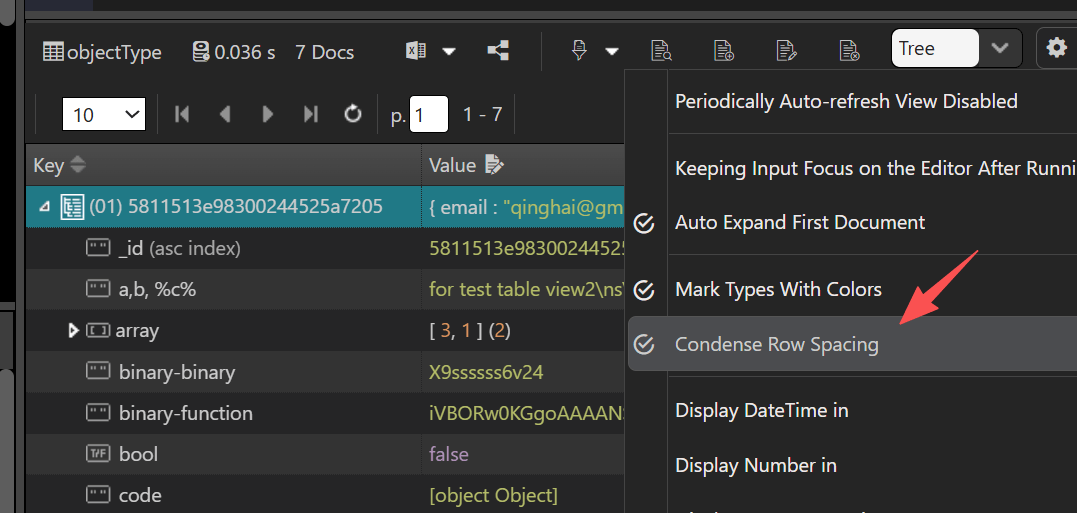
- Added, "Condense Row Spacing" option for Tree View and AG Grid Table View — toggle from the View menu to switch between comfortable (32px) and compact (24px) row heights.
- Fixed, a high-DPI display issue where the native menu bar and web content scaled inconsistently on Windows. The application now follows the system DPI setting automatically and correctly adjusts the zoom factor when the display scaling changes (e.g., switching between 150% and 200%).
- Fixed, a bug that caused license activation to freeze on Apple Silicon Macs.
- Fixed, a freeze issue on macOS when reloading the application window — the app now recreates the window instead of using the unreliable reload mechanism in Electron 40.
- Fixed, OIDC authentication token not refreshing correctly.
- Fixed, clipboard paste priority issue — pasted content now correctly takes precedence over the current selection.
- Fixed, DBRef fields containing ObjectId values and Code scope were not serialized correctly when copying or exporting documents.
- [Breaking Change] The connection tree no longer auto-prepends
username@to connection names. If you previously relied on this automatic prefix to distinguish connections, you will need to include the username in the connection name manually (e.g.,admin@MyServer). This change gives users full control over connection naming and eliminates inconsistencies between the tree view, toolbar dropdown, and editor tabs. - Improved, the authSource placeholder in the connection editor now dynamically reflects the Default Database setting from the More tab instead of showing a hardcoded value.
- Improved, the Connections dialog now remembers your last sort column and order — no need to re-sort every time you open it.
Version 11.0.2
Fixed, a regression where scripts containing multiple queries (e.g. several
db.collection.find()statements) silently dropped some result tabs. All query results are now reliably displayed, each in its own tab with a consistent "LineN collection.method..." title. The maximum number of result tabs has also been raised from 3 to 50.Fixed, a bug where the application failed to relaunch after an auto-update was downloaded and installed. Updates now always complete and the new version starts cleanly.
Fixed, Ctrl+C copy-as-plain-text in the data viewer's Tree view and Table view. Ctrl+C now works reliably regardless of selection state, and standard clipboard shortcuts (Ctrl+C / Ctrl+V / Delete) in Table view are restored.
Improved, the right-click context menus have been reorganized into logical submenus to prevent overflow on large / high-DPI displays:
- Script Editor context menu — the menu is reduced from 33-37 rows to about 27 rows by grouping related actions into Code Actions, File, and Debug Actions submenus, while keeping frequently-used items in the top level.
- Connection tree context menus — Collection / Database / Connection node menus are restructured into Collection Management, Data Transfer, Info & Diagnostics, and other logical submenus. Write operations are automatically disabled when the connection is read-only.
Fixed, connection tree node text truncation and tooltip display. Long node names are now truncated in VS Code style (suffix elision) so the recognizable start of the name is preserved, and hovering over a truncated name reliably shows the full text in a tooltip.
Fixed, a bug in the More tab of the connection editor where editing an existing URI option would silently overwrite the user's current value with the default. The dialog now preserves the user's existing setting during edits.
Version 11.0.3
Added, Anthropic protocol support to the built-in AI Helper, enabling connections to Anthropic Claude models (including Claude Sonnet 4) and compatible third-party services like DeepSeek. The new Extended Thinking configuration lets you control the model's reasoning budget (
budget_tokens) for deeper analysis before responding. Aproviderfield ('openai'or'anthropic') in the user model configuration determines which API protocol to use.Added, local AI proxy support to the AI Helper. The Content Security Policy now allows HTTP connections to
localhostand127.0.0.1on any port, so you can route AI requests through your own local proxy (LiteLLM, Ollama, LM Studio, etc.).Fixed, slow connections to single-host MongoDB replica sets in Kubernetes / Docker environments where the advertised RS members (e.g.
*.svc.cluster.localor internal Docker hostnames) are unreachable from the client. Connections now complete immediately instead of waiting for the fullserverSelectionTimeoutMS. Explicit replica-set connections (wherereplicaSetis set in the URI) are unaffected — read-preference routing and automatic failover still work as before.Fixed, multiple memory leaks across the UI that could accumulate during long sessions. Tooltip rendering in the data viewer, editor command closures in the script editor, and history script storage now clean up detached DOM nodes and global references correctly.
Fixed, table columns in the data viewer being squished when displaying more than 10 columns. ObjectId columns now use a wider default width (120px) to keep 24-character hex values readable, and all columns have a minimum width constraint (50px general, 80px for ObjectId) to prevent excessive compression.
Fixed, middle-clicking a tab in the script editor would sometimes close multiple tabs instead of just the targeted one. Middle-click now reliably closes only the clicked tab.
Fixed, collection name auto-detection in the script editor where the
getCollectionNames()helper could match incorrect collection names due to regex greediness (e.g., extractingjobs.find({_id:...instead of justjobs). Collection name extraction is now more accurate, with additional validation guards that prevent malformed names from being sent to the auto-complete system.Fixed, a connection stability issue where reconnecting after a disconnection could cause "Connection i is wrong" errors on the frontend. The internal connection identifier is now preserved correctly across reconnections, keeping the UI in sync with the backend.
Improved, collection and database rename in the connection tree:
- The rename prompt now defaults to the current name instead of automatically appending "_new", reducing accidental typos.
- Leaving the name empty now cancels the operation cleanly.
- Entering the same name as before now shows a clear message and lets you enter a different name.
- Renaming a database to an already-existing name now triggers a warning and allows re-entry.
Version 11.0.4
Added, Tree View Preview Fields — a major new capability that lets you hand-pick which fields to display as document summaries in the Tree View, with per-collection field chooser, connection-level persistence, nested path support, and smart auto mode. See the Tree View Preview Fields section above for full details.
Added, nested dot-notation path support in the Tree View preview field chooser. You can now select nested fields like
address.cityto display specific sub-document values in the tree summary.Added, smart auto preview field selection in Tree View:
- Auto mode limits to 3 fields for a cleaner, more focused summary.
- Sensitive fields (password, jwt, secret, api_key, credential, token, and their plural forms) are automatically excluded from preview.
- Complex object types (embedded documents, arrays) are skipped in favor of simple scalar values.
- Field values are intelligently truncated (60 chars per value, 240 chars total) to keep the display compact while preserving meaningful information.
Fixed, script editor tab hang on workspace restore caused by regex catastrophic backtracking when processing large scripts with many string literals. The TypeScript feature detection regex has been replaced with a safe two-pass approach, and multiple guard layers now prevent any editor initialization error from blocking tab restoration.
Version 11.0.5
- Fixed, email validation in the license registration form was too restrictive. The validator now adopts the WHATWG HTML5 email pattern (the same standard used by browsers), correctly accepting emails with uppercase letters, underscores, and other valid special characters in the local part.
Thank you!
Please visit our feedback page or click the “Feedback” button in the app. Feel free to suggest improvements to our product or service. Users can discuss your suggestion and vote for and against it. We’ll look at it too.